Object Detection
In the current Web UI, object detection is not limited to a single method. EyesOnIt lets you start with a broad object type and then refine that detection with natural language, face recognition, or image similarity.
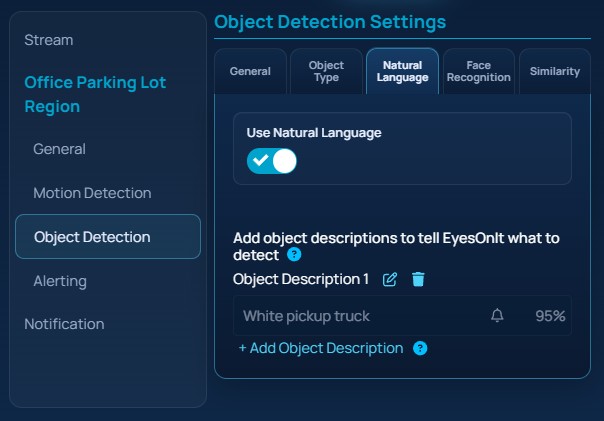
The image below shows the detection tabs for a region.
Common Object Type
A common object type is a broad family of objects that EyesOnIt can detect. In the current Web UI, the main built-in object types are:
- person
- vehicle
- animal
- bag
You can also choose Something Else and rely on other matching methods to describe the target more specifically.
Specifying a common object type is often helpful because it narrows the search before more detailed matching is applied.
Object Descriptions
EyesOnIt supports natural language object descriptions. If you provide a common object type, the natural language description refines the objects detected through the common object type setting. For example, you might combine vehicle with a description like white pickup truck, or combine person with person wearing high-visibility vest.
Object descriptions include both foreground and background descriptions:
- Foreground descriptions describe the object or activity that you care about.
- Background descriptions describe scene elements that should help EyesOnIt understand what is normal in the image.
If the background is stable and easy to describe, a background description can help EyesOnIt distinguish the target from the surrounding scene.
For video workflows, foreground descriptions also have related alert settings:
Alert
A true / false flag indicating whether EyesOnIt should generate alerts for this object description.
Confidence Threshold
The confidence level threshold for alerts. Alerts will be sent if the confidence level exceeds this threshold.
Face Recognition
Face recognition is another way to define what should be matched. Instead of describing an object with text, you tell EyesOnIt to match either:
- one enrolled person
- all people in an enrolled group
Face recognition is conceptually different from natural language detection. Natural language describes what something looks like. Face recognition compares a detected face to enrollment data that has already been stored in EyesOnIt.
See Face Recognition for more detail.
Image Similarity
Image similarity is a way to search or detect by example. Instead of writing a description, you provide an example image or a result from a previous search. EyesOnIt then looks for detections that are visually similar to that example.
This is useful when the object is easier to show than to describe.
See Image Similarity for more detail.
Object Size
The object size tells EyesOnIt roughly how large the target is in your image or video frame. This helps EyesOnIt remove false positive detections. The object size is only an estimate, but it is still important because it tells EyesOnIt what scale of object should be considered plausible.
In the Web UI, EyesOnIt displays a size hint over the image or preview frame while you adjust this value.