Image Similarity
Image similarity is a way to tell EyesOnIt what you want by example instead of by text. You provide an image, or you choose a result from an earlier search, and EyesOnIt looks for visually similar detections.
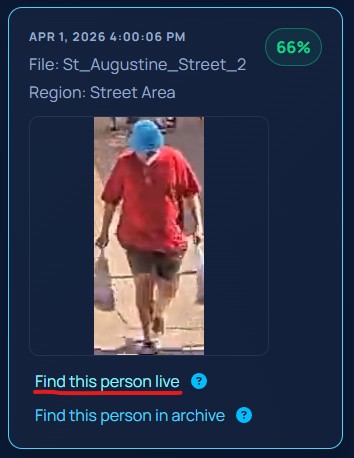
The image below shows an image-similarity workflow where an archive search result is used as the basis for a live search.
Why similarity is useful
Some objects are difficult to describe clearly with text. A written description may be too broad, too narrow, or simply hard to phrase. In those situations, an example image can be the clearest way to express what matters.
Image similarity is especially useful when:
- the object has a distinctive appearance
- you want to find results that resemble a previous result
- the object is easier to show than to describe
Similarity as a detection method
In detection workflows, image similarity lets a region look for something that resembles the uploaded example image. This works alongside the region concept and still uses a match threshold to decide how strong a similarity match should be.
Similarity in search
In Archive Search and Live Search, similarity can start in two ways:
- by uploading a new image
- by selecting an existing archive or live result as the similarity seed
When you use a previous result as the seed, you are effectively asking EyesOnIt to find "more things like this."
Match Threshold
Similarity uses a match threshold just like face recognition uses a match threshold. A higher threshold asks EyesOnIt to be more selective. A lower threshold allows looser visual matches.