
Search PPE history in Genetec
Find retained assessments of people wearing or missing the equipment configured for a camera.
Prepare PPE history
Section titled “Prepare PPE history”Configure the camera’s PPE detection. In Config Tool, enable Search → Search Indexing → PPE, apply the configuration, and keep analytics running during the period to investigate.
Only assessed equipment in configured regions is searchable. A gap in assessments does not establish compliance or missing equipment.
Search for missing gloves
Section titled “Search for missing gloves”- In Security Desk, open EyesOnIt Investigation → PPE.
- Select the lab camera in the camera tree.
- Check Missing selected PPE (clear to find wearing).
- Leave Require all selected items (clear for any) unchecked for an any-item condition.
- Select Gloves and clear the other equipment items.
- Choose a focused Recent or Range period, then Search.
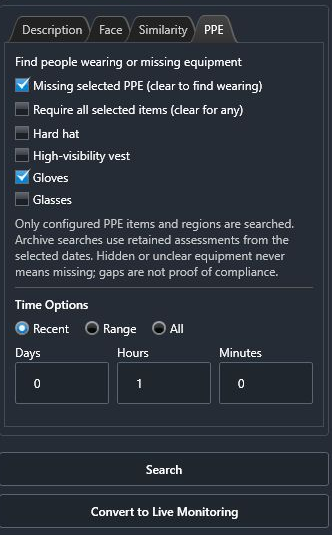
Clear the missing-equipment checkbox to find wearing assessments. With multiple equipment items selected, the all-items checkbox requires every selected item to qualify on the same person; leave it clear when any qualifying selected item is sufficient.
Review coverage and results
Section titled “Review coverage and results”Read coverage or availability messages before interpreting an empty result set. Hidden or unclear equipment remains unknown. Inspect available thumbnails and open mapped camera recordings to review the working sequence.
If the server reports search capacity or a time budget, narrow the cameras and period before trying again. A completed search with no retained assessments is different from a verified clear PPE assessment.
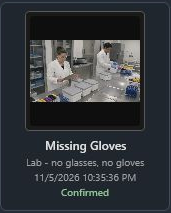
The illustrated search also reported incomplete analytics history. Its retained match confirms an assessment was returned; it does not establish complete coverage of the period.
Play the related recording
Section titled “Play the related recording”- Double-click a result thumbnail to open its mapped Genetec camera at the event time.
- Select the playback tile. Press E to enlarge it within the investigation workspace.
- Press G to pause and inspect the person’s hands. Press G again to resume. You can also use the tile’s Pause and Play controls.
The camera must be mapped and its recording available in Genetec. See Play back Genetec recordings for the mapping and playback requirements.
For a temporary PPE watch, use EyesOnIt Monitoring. Its search is separate from the saved camera’s incident rule.